AIS Gateway
A small campus of MCP servers. The front desk at api.aislabs.ai/mcp is free — connect it and your assistant can ask what buildings exist, what they cost, and how to pay. Each building is its own server: the daily CVE prioritization, and the Agent Flight Recorder. A key unlocks the building it's scoped to — or a campus pass opens everything, including buildings we add later. Buy once by card or crypto; nothing renews. Wallet-carrying agents can skip keys entirely and pay per call over x402.

CVE building · 30 days
$19
Full daily rankings, verdicts, and the KEV feed. Paid once.
Get the CVE key →Flight Recorder · 30 days
$19
20 monitors, stored capsules, resume links, fleet view. Paid once.
Get the Recorder key →Campus pass · 30 days
$29
Every building, every paid tool — including buildings added while your pass is live.
Get a campus pass →Campus pass · 12 months
$149
Under $12.50/month for the whole campus. Paid once.
Get the year pass →The campus
Front desk
ais-gateway · https://api.aislabs.ai/mcp all freeThe campus directory — every tool here is free.
| Tool | Tier | What it does |
|---|---|---|
| list_buildings | Free | Every building: URL, tools, prices, free tier, which key unlocks it. |
| how_to_pay | Free | The two payment doors, explained to your assistant. |
| about_aislabs | Free | What AIS sells and how agents can buy. |
CVE building
ais-cve · https://api.aislabs.ai/cve/mcpToday's ranked answer to “what do we patch first?” — scored on real exploitation (CISA KEV, EPSS, KEV-recency), regenerated daily.
| Tool | Tier | What it does |
|---|---|---|
| brief_teaser | Free | Today's top-3, no scores — try before you pay. |
| top_cves_today | Key · x402 $0.02 | The full ranked list with scores and methodology. |
| kev_fresh | Key · x402 $0.01 | Every CVE added to CISA KEV in the last 7 days, ranked. |
| cve_verdict | Key · x402 $0.005 | One CVE's verdict from today's ranked set. |
Agent Flight Recorder
ais-recorder · https://api.aislabs.ai/recorder/mcpA dead-man switch for autonomous agents and cron jobs: heartbeats with a state capsule; silence triggers an alert with the last capsule and a resume link.
| Tool | Tier | What it does |
|---|---|---|
| register_monitor | Free / Key | Watch an agent or cron job (free: 1 per alert target; key: 20). |
| heartbeat | Free / Key | The agent’s “still alive” ping, with an optional state capsule. |
| fetch_capsule | Key | The last capsule a dead agent sent — resume where it stopped. |
| fleet_status | Key | Every monitor you own: alive / late / dead. |
| delete_monitor | Free / Key | Remove a monitor. |
The full reference — inputs, HTTP twins for scripts and cron, prices — is in the docs.
Connect it in the Claude app — no terminal needed
Works in claude.ai on the web, the desktop app, and mobile (connectors sync across all three). Two minutes per building. Add the building your key covers — or start with the free front desk (https://api.aislabs.ai/mcp) and no header at all.
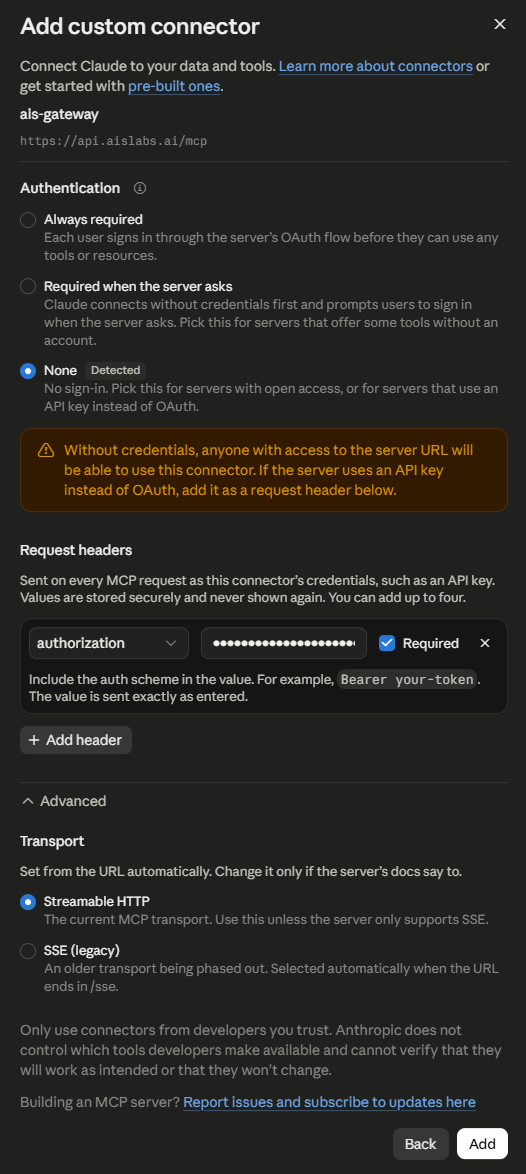
- Open Settings → Connectors → Add custom connector.
- Name: ais-cve (or ais-recorder) · URL: https://api.aislabs.ai/cve/mcp (or …/recorder/mcp)
- Authentication: None (the key is sent as a header, not an OAuth login).
- Under Request headers, add one: name authorization, value Bearer YOUR_KEY — paste the key exactly as emailed, keep Required checked.
- Transport stays Streamable HTTP. Click Add.
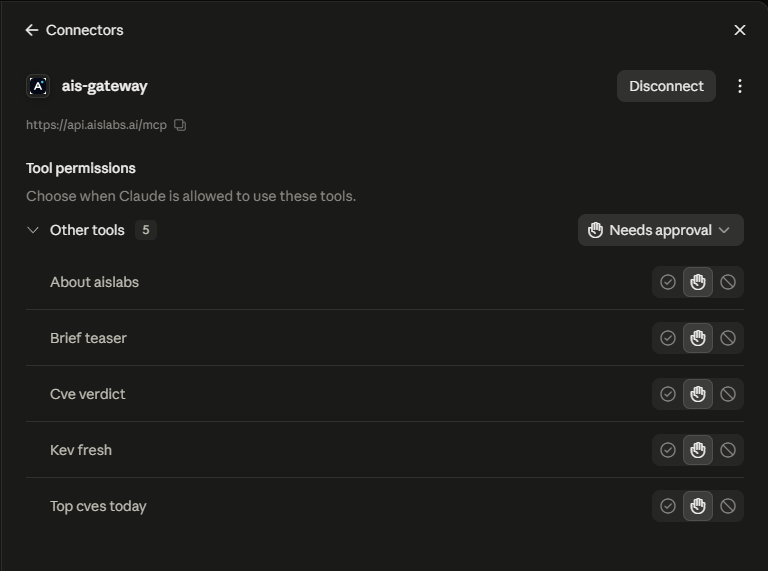
- In the connector's Tool permissions, leave "Needs approval" (Claude asks before each call) or set the tools you use daily to always allow.
Then just ask: "Use ais-cve — what should we patch first today?" Without a key the free tools still answer, and the paid ones tell Claude exactly how to unlock them.
Claude Code, Cursor, and other MCP clients
# the free front desk — no key needed
claude mcp add --transport http ais-gateway https://api.aislabs.ai/mcp

# a building your key covers
claude mcp add --transport http ais-cve https://api.aislabs.ai/cve/mcp --header "Authorization: Bearer YOUR_KEY"
claude mcp add --transport http ais-recorder https://api.aislabs.ai/recorder/mcp --header "Authorization: Bearer YOUR_KEY"
Or add them to any MCP client's config (Cursor, Claude Desktop, Windsurf…):
{
  "mcpServers": {
    "ais-cve": {
      "type": "http",
      "url": "https://api.aislabs.ai/cve/mcp",
      "headers": { "Authorization": "Bearer YOUR_KEY" }
    }
  }
}
The delivery email contains these snippets pre-filled for exactly the buildings your key covers. Scripts and cron jobs use the HTTP twins with the same key.
Straight answers
What does "scoped" mean? A key opens the buildings it's scoped to. The CVE key opens the CVE building; the Recorder key opens the Flight Recorder; the campus pass opens everything — including buildings we add while it's live. Use a key at the wrong building and the reply tells you exactly which key to add.
Is it a subscription? No — fixed-term access, paid once. When it expires, buy another. Nothing renews behind your back.
Wallet agents: don't need a key for CVE data. Every paid CVE tool has an HTTP twin that takes x402 per call (USDC on Base); Flight Recorder features take a key. See the docs.
Delivery: the key arrives by email from support@aislabs.ai the moment payment lands (crypto buyers without an email get it on the confirmation page).
Sales are final. A key is access, delivered instantly; it can't be returned. Trouble? support@aislabs.ai — a human answers.